I see warnings in my account
This is why you should resolve warnings before you create a report.
November 12, 2026
There are always warnings when data is missing. These are not system errors, but warnings that missing data here still has to be explained.
In the report overview you can see the number of warnings for a calendar year:

Important: Please look at the number of your warnings only once you have entered all of your wallets and exchanges in chain.report without exception - because otherwise warnings about missing data are exactly the consequence of that. For the warning count to be displayed as finally correct, it is necessary that all syncs and transaction calculations have been completed.
Warnings can also arise later
e.g. due to new underlying data from the exchanges (new features, less data, and many other possibilities)
tax law may have been amended.
on Dexes such as DefiChain, the environment is highly dynamic.
There are 4 types of warnings:
The origin of assets in a transaction is not known
The destination of a withdrawal is not known
The price of assets in a transaction is not known
A smart contract was not recognized and leads to a broken transaction
1. The origin of assets in a transaction is not known
The source of the funds used can be missing in your transaction. chain.report therefore cannot identify the original acquisition value of this asset. chain.report therefore sets the acquisition price of this asset to 0 € for you. A later disposal can increase the tax burden as a result.
Caution: Please avoid the buttons "Mark as bank deposit", "Mark as airdrop", or "Ignore" if you are not sure that this was exactly the correct purpose for it. You can potentially increase your tax burden unintentionally here as well.
The main cause is probably that you have not added the source wallet from which the funds come. If you add it afterwards, the warning resolves itself. But incomplete data and missing transactions on the part of the exchanges are also common and have to be added afterwards. You can see which limitations an exchange's API has in the dialog when creating the wallet. You can find a checklist for checking causes of missing transactions in this linked article.
To trace the original acquisition, you can take a closer look at the disposal list when expanding the transaction. Bear in mind that, for example, FIFO (First in First Out) applies as the sort order of an asset per wallet.
Here you will find a guide to editing warnings about missing sources:
2. The destination of a withdrawal is not known
If, for example, the destination wallet of a transfer is unknown, we have to assume a disposal. Without a known destination wallet, chain.report cannot recognize whether the asset is still in your possession or whether you have disposed of it.
chain.report will therefore defensively assume a taxable disposal - which, if left unresolved, can increase your tax burden
Caution: Please avoid the buttons "Mark as payment" or "Ignore" if you are not sure that this was exactly the correct use case. You can increase your tax burden unintentionally here as well.
The most likely solution is that you have not added the destination exchange of this withdrawal. That is exactly what you should do now. But if you really sold the assets here, you can mark the transaction as a payment.
Here you will find a guide to handling warnings about missing destination wallets of withdrawals:
3. The price of assets in a transaction is not known
In transactions, it can happen that no price information is available that is required for the gain calculation. chain.report generally uses the prices from coinmarketcap.com / CoinGecko.
Solution path 1:
You can check whether the price at the requested time is available on coinmarketcap.com or coingecko.com in order to add it.
Solution path 2:
Check that the correct asset was used. If an exchange, for example, provides a transaction with the asset $BEER instead of BEER, there will be no price information for BEER. So check whether the correct asset was recorded and potentially change the asset when editing the transaction.
You can find further information on how chain.report determines prices in this linked article.
Here you will find a guide to handling warnings about missing prices:
4. A smart contract was not recognized and leads to a broken transaction
Connected to a native blockchain (such as Ethereum or Solana), your wallet (e.g. MetaMask) can execute smart contracts. chain.report understands many of these smart contracts and assesses them correctly for tax purposes.
Unknown or exotic smart contracts in particular, however, cannot be read correctly without an individual implementation. If the automatic basic detection cannot be applied, the result is often a broken transaction. Broken transactions can, for example, be:
A trade in which, for example, the inflow or the outflow is missing
Other income for which only an outflow was read, but not an inflow
Transactions in which too much data was stored
.. other possible combinations
You can often recognize exactly this when reviewing the transaction. In addition, the explorer link and the tooltip of the transaction are a help that can point you to what really happened in this transaction - because that is exactly what you now have to map manually.
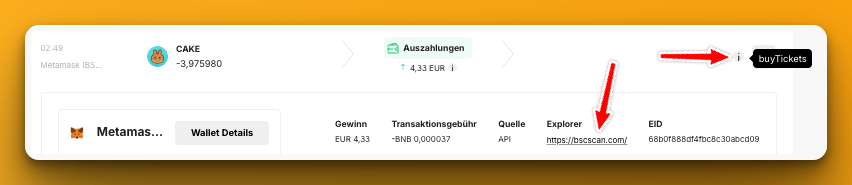
Logging in on the exchange can also help you obtain the information about which product you used here. Once you have determined what the execution really included, you can correct the transaction as follows:
1) Edit the transaction with the "Correct transaction" button
2) Delete the transaction and re-upload it using the template. This has the advantage that you then have a backup.
You can find a more detailed description of the corresponding warning and how to resolve it in this YouTube video:
Do you need professional support?
Take a look at our consulting packages in the Support tab and find out about individual portfolio support.
You have checked these points very carefully and you still see an error in chain.report?
That means you have found a concrete error and not a warning that you cannot explain?
Then we need a precise error description in which the error can be identified in concrete transactions or other points. Information would be, for example:
1) Which transaction(s) does it concern? (date, time, transaction type, token, amount, ...). Please give a single example if possible.
2) Where do you see an error?
3) Can a screenshot illustrate this?
4) Is there a matching CSV file? Then please upload this as well.
If you were able to identify errors this clearly, please send us the data via the support chat on the website.
If you cannot clearly identify the error or its cause:
Example: The tax burden is too high, but you do not know exactly why?
Example: You cannot resolve warnings?
Example: There are balance discrepancies in the wallets.
Please understand that we cannot take on a portfolio analysis for non-Professional users here in order to look for potential errors. This option exists for the Professional package. A good starting point here would be our FAQ - there you will find answers to these three points and most other questions.