My CSV upload does not work
These can be the reasons why the CSV upload fails.
November 12, 2026
Please make sure that you upload the correct CSV or XLSX. In the crypto.com app, for example, different transaction types can be exported:
So for every wallet, make sure that you export the correct file and then also select the correspondingly correct variant before you upload it. Of course, you should also only upload Binance CSVs to a Binance wallet you have created, crypto.com (App) CSVs to a crypto.com (App) wallet, and so on.
Example: You want to upload the CSV file with trades for the exchange Binance. To do this, you create a Binance wallet, click "Import data", and then select "Trade". Before the upload, you can often expand a guide here. For this example, it looks like this:
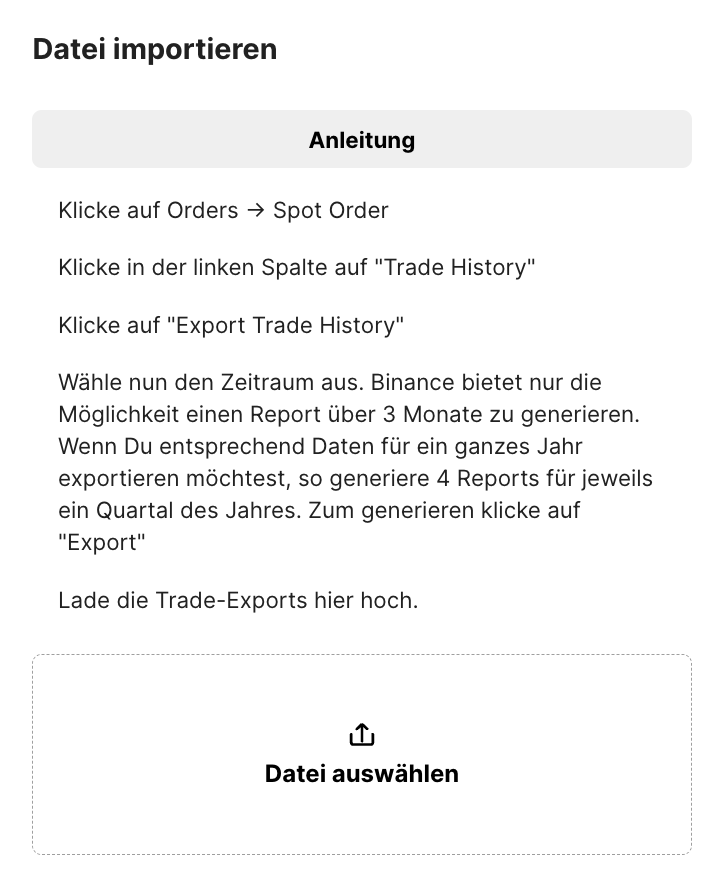
In addition: In every wallet you have created, you always also have the option to upload the chain.report template. So please check that you upload the correct file to the correct wallet with the correct CSV selection.
Make sure that the files are not reformatted. Microsoft Excel in particular saves the files after opening them in a different format (e.g. in the date representation). As a result, the file is no longer readable. Please therefore try again with a "fresh" file.
Take a look at the file with another editor. e.g. with Notepad. Are there any irregularities? Reformatting? Inserted blank lines? Please do not save after opening here either.
Your trades cannot be uploaded at KuCoin?
Then you have probably uploaded the wrong file, namely the orders as XLSX. You will find the correct file here:
https://www.kucoin.com/order/trade/detailThe ANYCOIN XLSX format is unfortunately broken after the export and therefore cannot be read in by chain.report. As a workaround, you can open the file with MS Excel and save it - after that, the file can be read in again.
With Plutus, the Dex Enhancer tool unfortunately delivers inconsistent formats. Therefore, some files cannot be read in. Note: Import is generally only possible via the Dex Enhancer.
With bake.io, make sure that you use the correct upload format, and please follow the explanatory video when creating the wallet. Euro must be explicitly selected as the currency, and the tax report must not be exported.
When using the template, make sure that you have filled in the columns correctly. For example, for the type, the deposit value with currency must not be missing and must not, for example, be swapped with the withdrawal column. Support does not review a template that has not been filled in correctly.
If these points have not helped,
contact us after a careful check via the contact form on the website, and we will check the format of the file. If a point from the list above applies, we unfortunately cannot process the bug report any further.
You have checked these points and still see an error in chain.report?
Then we need a precise error description in which the error can be identified on specific transactions or other points. Information would be, for example:
1) Which transaction(s) is it? (date, time, transaction type, token, amount, ...). Please give a single example if possible.
2) Where do you see an error?
3) Can a screenshot illustrate this?
4) Is there a matching CSV file? Then please upload it as well.
If you were able to identify errors this clearly, please send us the data via the support chat on the website.
If you cannot clearly identify the error or its cause:
Example: The tax burden is too high, but you do not know exactly why?
Example: You cannot resolve warnings?
Example: There are balance discrepancies in the wallets.
Please understand that we cannot take on a portfolio analysis for non-professional users in order to look for potential errors. This option exists for the Professional package. A good starting point here would be our FAQ - there you will find answers to these three points and most other questions.