Transactions are missing from my wallet
This is what you should check before you write a support ticket:
November 12, 2026
The transactions might correctly not be listed
Some transactions must not be imported for substantive reasons, because they are, for example, not relevant for tax purposes. It is also possible that parts of some CSVs must not be read, because these are redundant transactions from other CSVs or are only exchange-internal transactions. Some rows of a CSV file also cannot be extracted 1:1 as separate transactions, because they could, for example, be combined with other rows into one transaction.
Another possibility is that certain products of some exchanges are not offered as data either.
If you are missing transactions, for example after an API sync, this is often correct, because APIs, for example, often do not supply all data and products. It is possible, for example, that an API only supplies data from the last 3 months. Or it is possible that an exchange API does not supply transactions for Earn products or similar. chain.report then has no way to read these transactions.
Tip: Pay attention to the notice when you create the wallet, where you can find some information about limitations: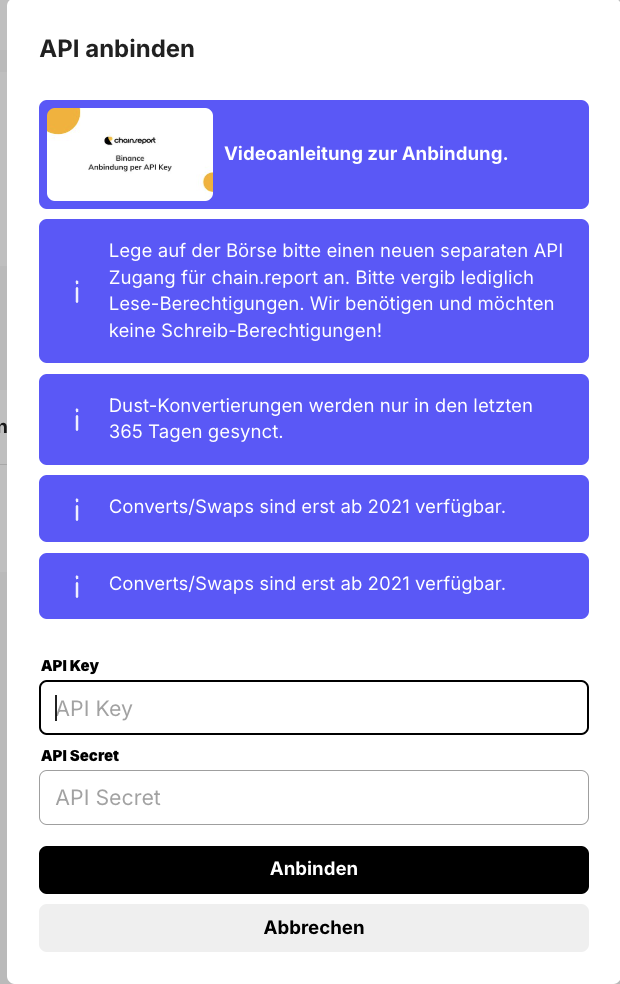
You see the transactions in the CSV, on the website, but not in your API (or the other way around)?
Unfortunately, the data of the exchanges often differs fundamentally between the various output formats. For example, also with regard to supported products. We therefore unfortunately cannot accept the other source as evidence of a missing transaction in a bug report.Transactions with wrapped assets such as WBTC or WETH (or similar) are not recorded)?
We follow the tax reasoning of our partner tax advisor and treat these assets as the same economic goods, so that, for example, the exchange of WBTC into BTC (or the other way around) does not constitute a disposal. Accordingly, we unify, for example, all WBTC and replace them with BTC. Since a trade of, for example, WBTC into BTC would thereby become a trade of BTC into BTC, transactions of this kind are no longer imported. This also means, however, that arbitrage trading between wrapped assets and native assets cannot be recorded, just like its fees, and that a strategy for recording is needed - especially in the case of frequent arbitrage trading.Are staking transactions missing from your Bitrex or Bitget wallet?
Bittrex unfortunately does not supply staking transactions via the API interface (as of December 2023). We therefore unfortunately still have no way to record these in chain.report.As soon as Bittrex makes this data available, we will connect the corresponding interface.
Our recommendation for a quick fix: Expand the deposits with a warning, edit the transaction, and change it into a staking transaction.
With Bitget as well, the API does not supply all rewards - even if they are shown on the web or in the CSV.
Are transactions for staking and referral rewards missing from your Bitvavo wallet?
If you have synced Bitvavo via the API interface, this information is unfortunately not provided by Bitvavo. We recommend using the CSV import here so that these transaction types are covered as well.Are transactions missing from your KuCoin wallet?
Via the KuCoin interfaces, the transactions are unfortunately only supplied up to a certain point in time. For some transaction types this is 9 months, and for other transaction types only 30 days.
Have you carried out liquidity mining on the DeFiChain?
Liquidity mining proceeds are booked in chain.report only once at the end of the day - specifically, aggregated as the collected distribution of the day in one transaction. Because of this later booking, it is possible that within a day there is a difference in the amount of one day's proceeds.Are Acount-to-UTXO or account-to-account transactions missing on the DeFiChain?
It can be correct that these are not displayed. If you look at the transaction in the DeFiScan Explorer, you will see that your wallet is both the recipient and the sender of the funds. The remaining fees are often so minor that the transaction is then not listed in chain.report.Transactions are missing from your DefiChain wallet? Node disconnects can be the reason:
Unfortunately, the DeFiChain node software remains unstable up to and including version 4.0.9. As a result, our nodes occasionally lose the connection. The consequence is that transactions can be missing and are no longer loaded afterwards. A further consequence is correspondingly deviating balances.
We hope for a stability update of the DeFiChain node software soon. The only thing that helps you here is to create it again, for example with the X button. And that is exactly why you should continue to plan for creating wallets again in the future as well.Transfer-domain transactions are missing from your MetaChain wallet
These are not really missing here, because for every TransferDomain deposit there is also, for example, a native deposit. If the TransferDomain deposit were recorded, the deposit would end up being recorded twice.
Edit: before 31.03.2024, this accompanying native deposit is unfortunately not always present, so a TransferDomain deposit before this date can be missing.Did you exchange DFI for WDFI? Or dBTC for BTC or csETH for ETH
These tokens are unified by us, and a corresponding trade would therefore have no effect - and is therefore not read.
Are transactions missing from your crypto.com Exchange wallet
Unfortunately, the API of the crypto.com API supplies very incomplete data. You can upload the spot_trades.csv here. However, you must make sure that no transactions are imported redundantly. You must expect manual follow-up work here in order to map your crypto.com Exchange correctly and completely in the end. We recommend sending a request to crypto.com support here in order to solve the problem of the missing data.
You can see here how to generate an API key at KuCoin:
Therefore, our recommendation:
It is best to use the CSV export from KuCoin. When you do so, please make sure to use the correct path to the trades CSV. If you download an XLSX file here, you have picked the wrong file. The CSVs can then be uploaded in the wallet via the "Import data" button. But there are data limitations at KuCoin here as well. If transactions are missing here as well, you can request all of your data from KuCoin support by email. You will then receive an Excel spreadsheet, which you can likewise upload in the wallet import on chain.report. But caution is required here as well: recently, KuCoin has frequently been sending the data that you could download yourself, which is therefore limited to 2 years. It is therefore crucial that you state in the email to KuCoin that you also need data that is older than 2 years.
Have you used the margin trading area of KuCoin?
This area is not yet supported by chain.report and can therefore also lead to missing transactions and incorrect balances.
Do you have other missing transactions, or are your wallet balances wrong?
Then please also be sure to look at this article.
Have you checked these points and you still see an error in chain.report?
Then we need a precise description of the error in which the error can be identified on specific transactions or other points. Information would be, for example:
1) Which transaction(s) does it concern? (date, time, transaction type, token, quantity, ...). If possible, give a single example.
2) Where do you see an error?
3) Can a screenshot make this clearer?
4) Is there a matching CSV file? Then please upload this as well.
But: A CSV file is fundamentally not evidence of missing data in the API connection. The data of CSV exports and APIs often differs on the part of the exchanges.
If you were able to identify errors this clearly, please send us the data via the support chat on the website.
If you cannot clearly identify the error or its cause:
Example: The tax burden is too high, but you do not know exactly why?
Example: You cannot resolve warnings?
Example: There are balance discrepancies in the wallets.
Please understand that we cannot take on a portfolio analysis for non-professional users here in order to look for potential errors. This option is available for the Professional package. A good starting point here would be our FAQ - there you will find answers to these three points and most other questions.